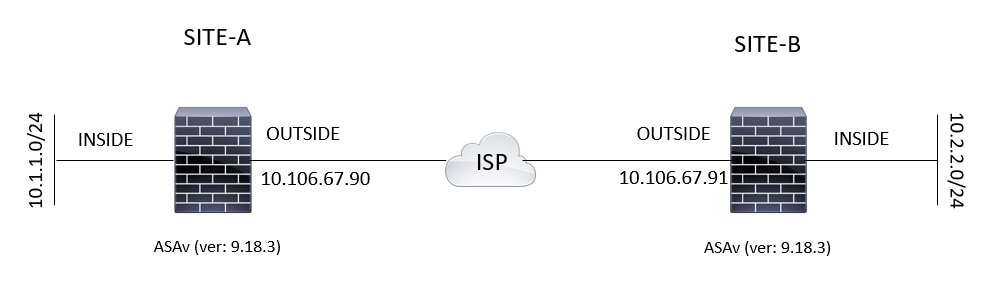
Tuesday, 2 April 2019

Site to Site - IPSec VPN on ASA


Configure Via the ASDM VPN Wizard

Complete these steps in order to set up the site-to-site VPN tunnel via the ASDM wizard:
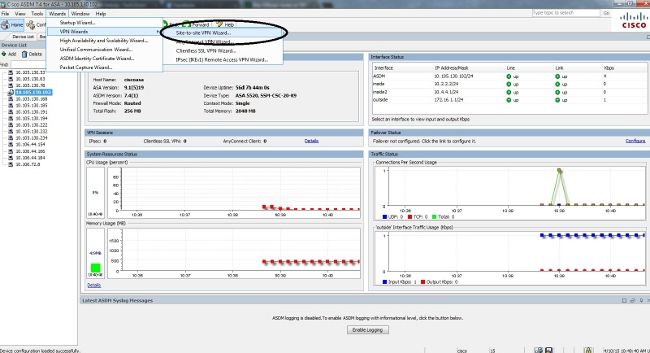
  1. Open the ASDM and navigate to Wizards > VPN Wizards > Site-to-site VPN Wizard:
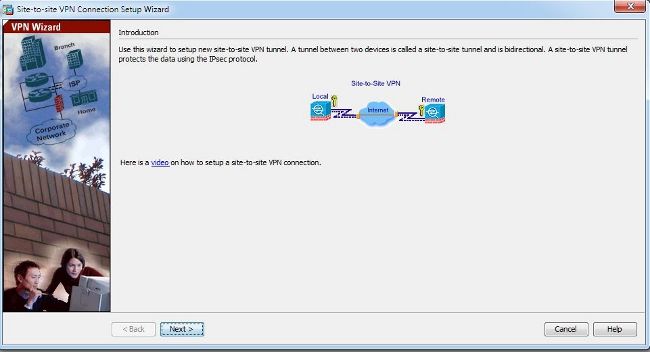
  2. Click Next once you reach the wizard home page:
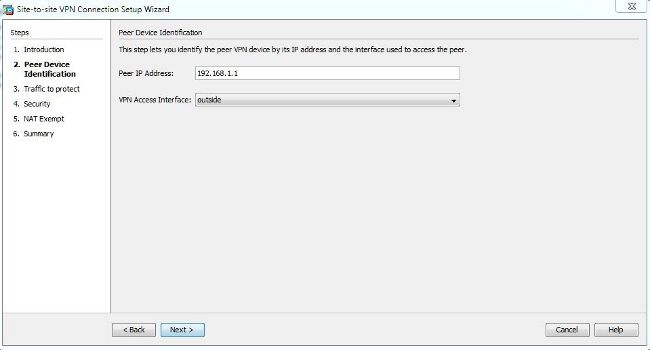
  3. Configure the peer IP address. In this example, the peer IP address is set to 192.168.1.1 on Site B. If you configure the peer IP address on Site A, it must be changed to 172.16.1.1. The interface through which the remote end can be reached is also specified. Click Next once complete.
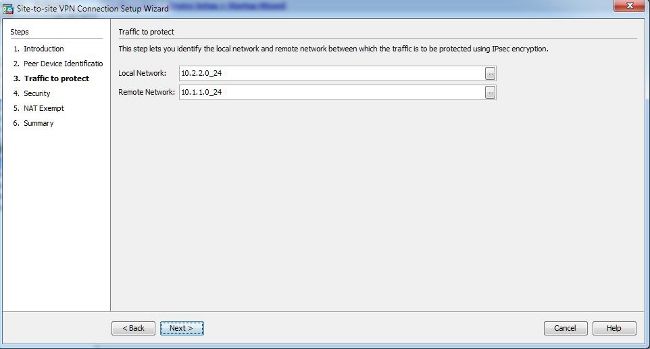
  4. Configure the local and remote networks (traffic source and destination). This image shows the configuration for Site B (the reverse applies for Site A):
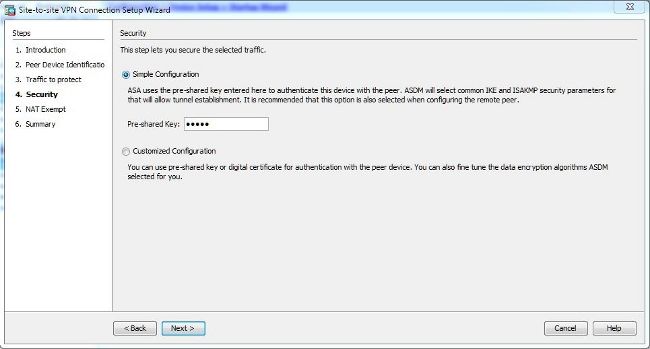
  5. On the Security page, configure the pre-shared key (it must match on both of the ends). Click Next once complete.
  6. Configure the source interface for the traffic on the ASA. The ASDM automatically creates the Network Address Translation (NAT) rule based on the ASA version and pushes it with the rest of the configuration in the final step.
  7. The wizard now provides a summary of the configuration that will be pushed to the ASA. Review and verify the configuration settings, and then click Finish.

    Configure Via the CLI

    Phase 1 (IKEv1)
    Complete these steps for the Phase 1 configuration:
    1. Enter this command into the CLI in order to enable IKEv1 on the outside interface:

      crypto ikev1 enable outside
    2. Create an IKEv1 policy that defines the algorithms/methods to be used for hashing, authentication, Diffie-Hellman group, lifetime, and encryption:

      crypto ikev1 policy 1
      !The 1 in the above command refers to the Policy suite priority
       (1 highest, 65535 lowest)
        authentication pre-share
        encryption aes
        hash sha
        group 2
        lifetime 86400
    3. Create a tunnel group under the IPsec attributes and configure the peer IP address and the tunnel pre-shared key:

      tunnel-group 192.168.1.1 type ipsec-l2l
      tunnel-group 192.168.1.1 ipsec-attributes
       ikev1 pre-shared-key cisco
      !Note the IKEv1 keyword at the beginning of the pre-shared-key command
    Phase 2 (IPsec)
    Complete these steps for the Phase 2 configuration:
    1. Create an access list that defines the traffic to be encrypted and tunneled. In this example, the traffic of interest is the traffic from the tunnel that is sourced from the 10.2.2.0 subnet to the 10.1.1.0. It can contain multiple entries if there are multiple subnets involved between the sites.

      In Versions 8.4 and later, objects or object groups can be created that serve as containers for the networks, subnets, host IP addresses, or multiple objects. Create two objects that have the local and remote subnets and use them for both the crypto Access Control List (ACL) and the NAT statements.

      object network 10.2.2.0
       subnet 10.2.2.0 255.255.255.0
      object network 10.1.1.0
       subnet 10.1.1.0 255.255.255.0
      
      access-list 100 extended permit ip object 10.2.2.0 object 10.1.1.0
    2. Configure the Transform Set (TS), which must involve the keyword IKEv1. An identical TS must be created on the remote end as well.

      crypto ipsec ikev1 transform-set myset esp-aes esp-sha-hmac
    3. Configure the crypto map, which contains these components:

      • The peer IP address
      • The defined access list that contains the traffic of interest
      • The TS
      • An optional Perfect Forward Secrecy (PFS) setting, which creates a new pair of Diffie-Hellman keys that are used in order to protect the data (both sides must be PFS-enabled before Phase 2 comes up)
    4. Apply the crypto map on the outside interface:

      crypto map outside_map 20 match address 100
      crypto map outside_map 20 set peer 192.168.1.1
      crypto map outside_map 20 set ikev1 transform-set myset
      crypto map outside_map 20 set pfs
      crypto map outside_map interface outside
    NAT Exemption
    Ensure that the VPN traffic is not subjected to any other NAT rule. This is the NAT rule that is used:
       
    nat (inside,outside) 1 source static 10.2.2.0 10.2.2.0 destination static 10.1.1.0 10.1.1.0 no-proxy-arp route-lookup
    object-group  network 10.x.x.x_SOURCE
     network-object  10.4.4.0 255.255.255.0
     network-object  10.2.2.0 255.255.255.0
    
    object network 10.x.x.x_DESTINATION
     network-object  10.3.3.0 255.255.255.0
     network-object  10.1.1.0 255.255.255.0
    
    nat (inside,outside) 1 source static 10.x.x.x_SOURCE 10.x.x.x_SOURCE destination
    Complete Sample Configuration
    Here is the complete configuration for Site B:
    crypto ikev1 enable outside
    
    crypto ikev1 policy 10
     authentication pre-share
     encryption aes
     hash sha
     group 2
     lifetime 86400
    
    tunnel-group 192.168.1.1 type ipsec-l2l
    tunnel-group 192.168.1.1 ipsec-attributes
     ikev1 pre-shared-key cisco
     !Note the IKEv1 keyword at the beginning of the pre-shared-key command.
    
    object network 10.2.2.0 
     subnet 10.2.2.0 255.255.255.0 
    object network 10.1.1.0
     subnet 10.1.1.0 255.255.255.0
    
    access-list 100 extended permit ip object 10.2.2.0 object 10.1.1.0
    
    crypto ipsec ikev1 transform-set myset esp-aes esp-sha-hmac
    
    crypto map outside_map 20 match address 100
    crypto map outside_map 20 set peer 192.168.1.1
    crypto map outside_map 20 set ikev1 transform-set myset
    crypto map outside_map 20 set pfs
    crypto map outside_map interface outside
    
    nat (inside,outside) 1 source static 10.2.2.0 10.2.2.0 destination static 10.1.1.0 10.1.1.0 no-proxy-arp route-lookup static 10.x.x.x_DESTINATION  10.x.x.x_DESTINATION no-proxy-arp route-lookup 

Tuesday, 5 February 2019


CheckPoint CLI troubleshooting & management commands (often used)


CheckPoint Firewall (basic troubleshooting commands incl. clustering)

cphaprob statList cluster status
cphaprob -a ifList status of interfaces
cphaprob syncstatshows the sync status
cphaprob listShows a status in list form
cphastart/stopStops clustering on the specfic node
cp_conf sicSIC stuff
cpconfigconfig util
cplic printprints the license
cprestartRestarts all Check Point Services
cpstartStarts all Check Point Services
cpstopStops all Check Point Services
cpstop -fwflag -procStops all checkpoint Services but keeps policy active in kernel
cpwd_admin listList checkpoint processes
cplic printPrint all the licensing information.
cpstat -f all polsrvShow VPN Policy Server Stats
cpstatShows the status of the firewall
fw tab -t sam_blocked_ipsBlock IPS via SmartTracker
fw tab -t connections -sShow connection stats
fw tab -t connections -fShow connections with IP instead of HEX
fw tab -t fwx_alloc -fShow fwx_alloc with IP instead of HEX
fw tab -t peers_count -sShows VPN stats
fw tab -t userc_users -sShows VPN stats
fw checklicCheck license details
fw ctl get int [global kernel parameter]Shows the current value of a global kernel parameter
fw ctl set int [global kernel parameter]  [value]Sets the current value of a global keneral parameter. Only Temp ; Cleared after reboot.
fw ctl arpShows arp table
fw ctl installInstall hosts internal interfaces
fw ctl ip_forwardingControl IP forwarding
fw ctl pstatSystem Resource stats
fw ctl uninstallUninstall hosts internal interfaces
fw exportlog .oExport current log file to ascii file
fw fetchFetch security policy and install
fw fetch localhostInstalls (on gateway) the last installed policy.
fw hastatShows Cluster statistics
fw lichostsDisplay protected hosts
fw log -fTail the current log file
fw log -s -eRetrieve logs between times
fw logswitchRotate current log file
fw lslogsDisplay remote machine log-file list
fw monitorPacket sniffer
fw printlic -pPrint current Firewall modules
fw printlicPrint current license details
fw putkeyInstall authenication key onto host
fw stat -lLong stat list, shows which policies are installed
fw stat -sShort stat list, shows which policies are installed
fw unloadlocalUnload policy
fw ver -kReturns version, patch info and Kernal info
fwstartStarts the firewall
fwstopStop the firewall
fwm lock_admin -vView locked admin accounts
fwm dbexport -f user.txtused to export users , can also use dbimport
fwm_startstarts the management processes
fwm -pPrint a list of Admin users
fwm -aAdds an Admin
fwm -rDelete an administrator

PROVIDER 1 Management

mdsenv [cma name]Sets the mds environment
mcdChanges your directory to that of the environment.
mds_setupTo setup MDS Servers
mdsconfigAlternative to cpconfig for MDS servers
mdsstatTo see the processes status
mdsstart_customer [cma name]To start cma
mdsstop_customer [cma name]To stop cma
cma_migrateTo migrate an Smart center server to CMA
cmamigrate_assistIf you dont want to go through the pain of tar/zip/ftp and if you wish to enable FTP on Smart center server

VPN Troubleshooting

vpn tuVPN utility, allows you to rekey vpn
vpn ipafile_check ipassignment.conf detail‏Verifies the ipassignment.conf file
dtps licshow desktop policy license status
cpstat -f all polsrvshow status of the dtps
vpn shell /tunnels/delete/IKE/peer/[peer ip]delete IKE SA
vpn shell /tunnels/delete/IPsec/peer/[peer ip]delete Phase 2 SA
vpn shell /show/tunnels/ike/peer/[peer ip]show IKE SA
vpn shell /show/tunnels/ipsec/peer/[peer ip]show Phase 2 SA
vpn shell show interface detailed [VTI name]show VTI detail

DEBUGGING PACKETFLOW

fw ctl zdebug dropshows dropped packets in realtime / gives reason for drop

CHECKPOINT GAIA CLISH COMMANDS

show commands
save configsave the current configuration
show commandsshows all commands
show allowed-client allshow allowed clients
show arp dynamic alldisplays the dynamic arp entries
show arp proxy allshows proxy arp
show arp static alldisplays all the static arp entry
show asdisplays autonomous system number
show assets alldisplay hardware information
show bgp statsshows bgp statistics
show bgp summaryshows summary information about bgp
show vrrp statsshow vrrp statistics
show bootp statsshows bootp/dhcp relay statistics
show bootp interfaceshow all bootp/dhcp relay interfaces
show bonding groupshow all bonding groups
show bridging groupsshow all bridging groups
show backupsshows a list of local backups
show backup statusshow the status of a backup or restore operation being performed
show backup last-successfulshow the latest successful backup
show backup logsshow the logs of the recent backups/restores performed
show clockshow current clock
show configurationshow configuration
show-config stateshows the state of configuration either saved or unsaved
show dateshows date
show dns primaryshows primary dns server
show dns secondaryshows secondary dns server
show extended commandsshows all extended commands
show groupsshows all user groups
show hostnameshow host name
show inactivity-timeoutshows inactivity-timeout settings
show interfacesshows all interfaces
show interfaces ethxshows settings related to an interface “x
show interfacesshow detailed information about all interfaces
show ipv6-stateshows ipv6 status as enabled or disabled
show management interfaceshows management interface configuration
show ntp activeshows ntp status as enabled or disabled
show ntp serversshows ntp servers
show ospf databaseshows ospf database information
show ospf neighborsshows ospf neighbors information
show ospf summaryshows ospf summary information
show pbr rulesshows policy based routing rules
show pbr summaryshows policy based routing summary information
show pbr tablesshow pbr tables
show routeshows routing table
show routed versionshows information about routed version
show snapshotsshows a list of local snapshots
show snmp agent-versionshows whether the version is v1/v2/v3
show snmp interfacesshows snmp agent interface
show snmp traps receiversshows snmp trap receivers
show timeshows local machine time
show timezoneshow configured timezone
show uptimeshow system uptime
show usersshow configured users and their homedir, uid/gid and shell
show user <username>shows settings related to a particular user
show version allshows version related to os edition, kernel version, product version etc
show virtual-system allshow virtual-systems configured
show vpn tunnelsuse to show the vpn tunnels
show vrrp statsshows vrrp status
show vrrp interfacesshows vrrp enabled interfaces

set commands

add allowed-client host any-host / add allowed-client host <ip address>add any host to the allowed clients list/ add allowed client by ipv4 address
add backup localcreate and store a backup file in /var/cpbackups/backups/( on open servers) or /var/log/cpbackup/backups/ ( on checkpoint appliances)
add backup scp ip value path value username valueadds backup to scp server
add backup tftp ip value [ interactive ]adds backup to tftp server
add snapshotcreate snapshots which backs up everything like os configuration, checkpoint configuration, versions, patch level), including the drivers
add syslog log-remote-address <ip address> level <emerg/alert/crit/err/warning/notice/info/debug/all>specifies syslog parameters
add user <username> uid <user-id-value> homedircreates a user
expertexecutes system shell
haltput system to halt
historyshows command history
lock database overrideoverrides the config-lock settings
quitexits out of a shell
rebootreboots a system
restore backup local [value]restores local backup interactively
rollbackends the transaction mode by reverting the changes made during transaction
save configsave the current configuration
set backup restore local <filename>restores a local backup
set core-dump <enable/disable>enable/disable core dumps
set date yyyy-mm-ddsets system date
set dhcp server enableenable dhcp server
set dns primary <x.x.x.x>sets primary dns ip address
set dns secondary <x.x.x.x>sets secondary dns ip address
set expert-passwordset or change password for entering into expert mode
set edition default <value>set the default edition to 32-bit or 64-bit
set hostname <value>sets system hostname
set inactivity-timeout <value>sets the inactivity timeout
set interface ethx ipv4-address x.x.x.x mask-length 24adds ip address to an interface
set ipv6-state on/offsets ipv6 status as on or off
set kernel-routes on/offsets kernel routes to on/off state
set management interface <interface name>sets an interface as management interface
set message motd valuesets message of the day
set ntp active on/offactivates ntp on/off
set ntp server primary x.x.x.x version <1/2/3/4>sets primary ntp server
set ntp server secondary x.x.x.x version <1/2/3/4>sets secondary ntp server
set snapshot revert<filename>revert the machine to the selected snapshot
set snmp agent on/offsets the snmp agent daemon on/off
set snmp agent-version <value>sets snmp agent version
set snmp community <value> read-onlysets snmp readonly community string
add snmp interface <interface name>sets snmp agent interface
set snmp traps receiver <ip address> version v1 community valuespecifies trap receiver
set snmp traps trap <value>set snmp traps
set static-route x.x.x.x/24 nexthop gateway address x.x.x.x onadds specific static route
set time <value>sets system time
set time zone <time-zone>sets the time zone
set vsx offsets vsx mode on
set vsx onsets vsx mode off
set user <username> passwordsets users password
set web session-timeout <value>sets web configuration session time-out in minutes
set web ssl-port <value>sets the web ssl-port for the system